
O&O DiskImage Professional 22 Review: Complete Backup Software for Windows 11
Introduction to O&O DiskImage Professional Backup Solution
O&O DiskImage Professional stands as one of the most reliable backup solutions available for Windows users today. Developed by German software company O&O Software, this powerful tool provides comprehensive system recovery capabilities that protect your data against hardware failure and malware attacks. With the latest version 22.4.1206 released in February 2026, O&O DiskImage Professional continues to earn praise from critics and users alike.
In an era where digital data represents immense value, having dependable backup software is essential. O&O DiskImage Professional delivers enterprise-grade protection with consumer-friendly simplicity.
What Makes O&O DiskImage Professional Different?
German Engineering and Reliability
Unlike many competitors, O&O DiskImage Professional benefits from decades of German software development expertise. The company focuses exclusively on Windows optimization, ensuring their backup software integrates seamlessly with Microsoft operating systems. This specialization means more reliable system recovery when you need it most.
Regular Updates and Long-Term Support
The development team releases frequent updates—version 22 alone received three major updates in early 2026 . This commitment ensures O&O DiskImage Professional remains compatible with the latest Windows updates and emerging security threats.
Key Features of O&O DiskImage Professional
Advanced Disk Imaging Technology
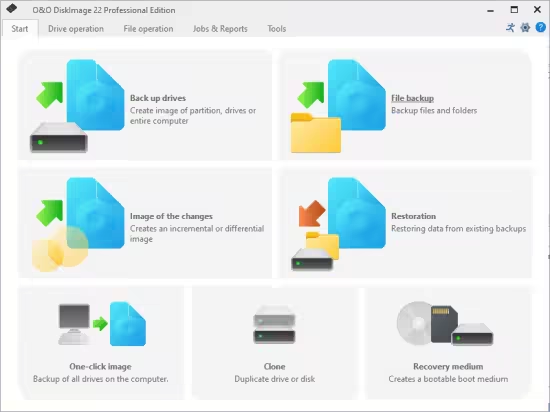
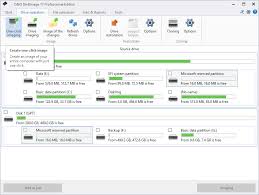
O&O DiskImage Professional enables users to create full system images of entire computers with just one click. These exact copies capture everything—operating system, applications, settings, and personal files—creating a complete snapshot of your working environment.
Differential and Incremental Backups
The software intelligently supports both differential and incremental backups, saving only changes since your last backup. This approach dramatically reduces storage requirements while maintaining comprehensive protection.
- Differential backups capture all changes since the last full backup
- Incremental backups capture only changes since the last backup of any type
Hot Imaging on the Fly
One of the most practical features is hot imaging on the fly, which creates backups while you continue working. No need to shut down applications—O&O DiskImage Professional captures everything in the background.
Machine Independent Restoration
Restore System to Completely Different Hardware
The proprietary Machine Independent Restoration (M.I.R.) technology allows you to restore system to completely different hardware configurations. PC Welt successfully demonstrated this by transferring a Windows system from an ARM-based computer to an Intel-based machine.
Why M.I.R. Matters
When your computer fails or you upgrade to a new PC, Machine Independent Restoration eliminates the need for fresh Windows installation. Simply restore your backup to the new hardware, and everything works.
Automation Capabilities for Power Users
PowerShell Backup Scripts
IT professionals appreciate the PowerShell backup scripts capability. O&O DiskImage Professional offers full command-line control, enabling sophisticated script-based backup automation for:
- Scheduled unattended backups across multiple computers
- Centralized management through existing IT frameworks
- Custom backup routines for specialized requirements
Flexible Scheduling Options
Version 22 introduces hourly backup patterns and continuous backup intervals from immediate to 24 hours . The catch-up backup feature ensures you never miss critical backups.
Security Features Protecting Your Data
AES-Based Encryption for Server Images
O&O DiskImage Professional delivers AES-based encryption for server images with 256-bit strength—the same standard used by governments and financial institutions. Your backups remain secure whether stored locally or on network drives.
Password Protection
Enhanced password security using secure memory storage prevents unauthorized access to your backups. Combined with automatic checksum validation, you can trust your data remains both private and recoverable.
Boot and Recovery Options
O&O DiskImage To Go
Version 19 introduced DiskImage To Go, transforming any external drive into a bootable recovery medium. When connected, this drive can restore your system with one button press—eliminating frantic searches for installation media during emergencies.
Windows PE Boot Media
The software enables creation of Windows PE boot media with integrated drivers. This boot medium works independently of original hardware, making it usable even when switching computers.
Performance Analysis
CHIP Magazine Test Results
CHIP tested O&O DiskImage Professional version 20.1.336 with these results:
| Metric | Performance |
|---|---|
| Backup duration | 268 seconds |
| Restore duration | 276 seconds |
| Compression ratio | 98% |
| CPU load during backup | 67% |
Real-World Performance
Users report excellent performance for disk imaging software for Windows, with particularly fast restore times when using M.I.R. The software handles large drives efficiently, with support for disks over 2TB and GPT partitions.
Pricing and Licensing
One-Time Purchase Model
Unlike subscription-based competitors, O&O DiskImage Professional offers a one-time purchase model:
- Single PC license: €49.90 (approximately $54 USD)
- Up to 5 PCs: €69.90 (approximately $76 USD)
Free Trial Available
A fully functional 30-day free trial lets you test all features before committing. The trial includes full access with no artificial limitations.
System Requirements
Supported Operating Systems
O&O DiskImage Professional officially supports:
- Windows 11 (including ARM versions)
- Windows 10 (x86, x64, and ARM)
- Windows 8.1 with latest updates
Hardware Compatibility
The software works with:
- BIOS and UEFI systems including Secure Boot
- SSDs, HDDs, NVMe drives
- RAID controller backup for hardware RAID arrays
- External USB and network drives
Comparison with Other Backup Tools
O&O vs. Free Backup Tools
While free tools offer basic protection, O&O DiskImage Professional provides critical advantages:
- Machine Independent Restoration (missing in free tools)
- Professional technical support
- Regular updates ensuring Windows 11 compatibility
O&O vs. Enterprise Solutions
For small businesses and professionals, O&O DiskImage Professional hits the sweet spot between consumer tools and expensive enterprise software—offering 95% of enterprise features at 10% of the cost.
Who Should Use O&O DiskImage Professional?
Home Users
Home users with valuable photos and documents benefit from the simple interface and reliable system recovery. The one-click backup feature makes protection effortless.
IT Professionals
IT administrators appreciate PowerShell backup scripts and script-based backup automation for managing multiple computers efficiently.
Small Businesses
Small businesses without dedicated IT staff find O&O DiskImage Professional offers enterprise-grade protection with consumer-friendly simplicity.
Step-by-Step Quick Start Guide
Creating Your First Full System Image
- Launch O&O DiskImage Professional
- Click “Back up drives” on the main interface
- Select your system drive (usually C:)
- Choose destination (external drive recommended)
- Click “Start backup”
Scheduling Automatic Backups
Configure:
- Daily incremental backups at 2:00 AM
- Weekly differential backups on Sundays
- Monthly full system images on the first of the month
Conclusion
O&O DiskImage Professional delivers enterprise-grade backup capabilities for Windows users at a fraction of enterprise cost. Its combination of reliable imaging technology, flexible restoration options, and extensive automation features makes it suitable for both home users and IT professionals.
For users seeking a Windows disaster recovery solution that handles everything from simple file backups to complex system migrations, O&O DiskImage Professional deserves serious consideration. The one-time purchase model offers excellent value compared to subscription-based competitors.
Frequently Asked Questions
Can I use O&O DiskImage Professional on multiple computers? Yes, the 5-PC license covers up to five computers.
Does it work with Windows 11 version 24H2? Yes, version 22.4.1206 and later fully support Windows 11 24H2.
Is cloud backup supported? Yes, you can back up to any cloud storage that appears as a drive letter.
Leave a Reply