

IObit Malware Fighter Review – Protect Your PC from Malware & Spyware
In today’s world, malware, spyware, and ransomware are becoming increasingly sophisticated. Even if you have a standard soft antivirus program, your PC might still be vulnerable to hidden threats. That’s where comes in — a security tool designed to provide advanced malware protection for Windows users.
In this post, we’ll take a close look at what soft offers, how it works, its strengths and weaknesses, and whether it’s worth adding to your PC security toolkit.
What is IObit Malware Fighter?
IObit Malware Fighter is an anti-malware program that focuses on detecting and removing threats that traditional antivirus software might miss. It uses dual engines — IObit’s own malware engine and the Bitdefender engine in the Pro version — to scan for viruses, spyware, adware, trojans, and ransomware.
The software is designed to be user-friendly, making it suitable for beginners while still offering advanced features for more experienced users. With real-time monitoring and multiple protection layers, it’s a solid addition to your PC’s security setup.

Key Features:
Here’s what soft makes stand out from the competition:
- Real-Time Protection: Continuously monitors your PC for malware threats.
- Anti-Ransomware: Blocks ransomware before it can encrypt your files.
- Bitdefender Engine (Pro): Adds an extra layer of detection for enhanced protection.
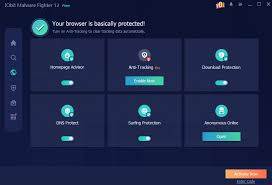
- Browser Protection: Safeguards against malicious websites, phishing, and ads.
- USB Drive Protection: Prevents malware from spreading through external drives.
- Automatic Updates: Keeps malware definitions current without manual effort.
- Lightweight Design: Runs without slowing down your computer.
These features make it ideal for users who want more than a standard antivirus program — especially if you’re concerned about ransomware or spyware.
Pros and Cons
Like any software, IObit Malware has its strengths and weaknesses.
Pros:
- Easy to install and use.
- Dual-engine scanning improves malware detection.
- Real-time protection against multiple threats.
- Lightweight, so it won’t slow your system.
- Affordable Pro version with extra features.
Cons:
- Free version has limited features compared to Pro.
- Occasionally reports false positives.
- Some advanced features require a subscription.
How to Use
Getting started with Malware Fighter is straightforward:
- Download & Install: Visit the official IObit website and download the latest version.
- Run a Full Scan: Perform a full system scan to detect any hidden malware.
- Enable Real-Time Protection: Keep this on for continuous monitoring.
- Schedule Automatic Scans: Set weekly or daily scans to maintain protection.
- Update Virus Definitions: Make sure your database is always up-to-date.
Following these steps will ensure your PC stays protected without manual intervention.
IObit vs Other Antivirus Programs
While standard antivirus programs like Windows Defender, Avast, or AVG are great for general protection, Malware Fighter focuses more on malware and spyware detection. It’s designed to catch threats that traditional antivirus might miss, including ransomware and spyware lurking in the background.
Many users find that using Malware Fighter alongside their regular antivirus gives extra peace of mind — a dual layer of protection without conflicts.

Final Verdict
Overall, soft is a reliable, lightweight, and user-friendly anti-malware tool. Its Pro version offers extra features like the Bitdefender engine and advanced ransomware protection, which are worth considering for serious PC users.
If you want to strengthen your PC’s defense and catch threats that standard antivirus programs might miss, soft is definitely worth trying.
Leave a Reply