 Skip to content
Lazesoft Recovery Suite Technician Edition: Ultimate Tool for IT Professionals
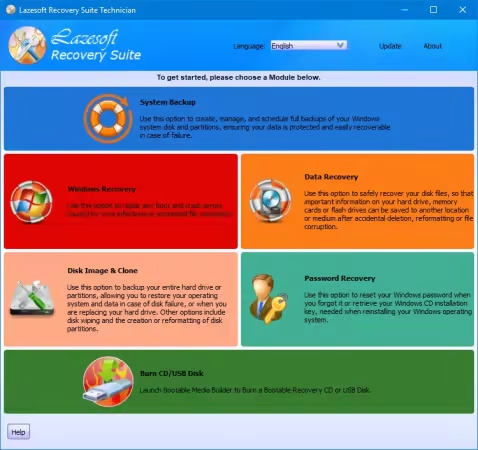
Imagine this: a client calls you in a panic because their computer won’t start, and critical files are nowhere to be found. For IT professionals, situations like this happen more often than we’d like. Lazesoft Recovery Suite 5.0.0.1 Technician Edition is designed to turn these stressful moments into manageable tasks. With its all-in-one toolkit, you can recover files, fix broken systems, and regain access to locked accounts — all without juggling multiple programs.
Why Lazesoft Technician Edition Is Different
Not all recovery tools are created equal. The Technician Edition is tailored for people who deal with tricky computer problems daily. Instead of offering a single feature, it bundles multiple solutions into one program. You can think of it as a Swiss Army knife for IT specialists.
For example, if a Windows machine refuses to boot after a failed update, or a hard drive suddenly becomes inaccessible, this software gives you the ability to investigate and fix the problem efficiently. Unlike consumer-grade tools, it doesn’t limit you to one kind of recovery — it adapts to the situation.
Real-World Uses of Lazesoft Recovery Suite
Recover Lost Files Fast
A small business accidentally deletes an entire folder of invoices. With Lazesoft Technician Edition, scanning the drive and retrieving those files takes minutes. Its support for different storage types, from hard drives to memory cards, ensures no critical data is left behind.

Fix Systems That Won’t Start
Sometimes, computers refuse to boot due to corrupted system files. Rather than reinstalling Windows and losing hours of setup, technicians can use Lazesoft to repair the operating system. Its bootable media option allows you to access and fix a machine without touching the original data
Regain Access with Password Reset
Forget a password? Lazesoft doesn’t just help users recover files — it can reset local or admin passwords, saving you from lengthy account lockouts. IT teams can restore access quickly and securely, keeping downtime to a minimum.
Clone Drives for Safety
Upgrading or replacing a computer doesn’t have to be stressful. With disk cloning and imaging tools built in, you can copy entire drives, ensuring every file and setting remains intact. This is perfect for technicians preparing new machines or safeguarding against future failures.
Why IT Professionals Recommend It
Lazesoft Technician Edition stands out because it’s practical, efficient, and reliable. Professionals choose it because it simplifies complex tasks without requiring multiple programs. A single software covers almost every problem an IT technician might encounter, from recovering lost data to rebooting a dead system.
Even for newcomers, the interface is intuitive. Step-by-step guidance means that even advanced recovery procedures are approachable, making it easier to handle emergencies calmly.
Getting Started Quickly
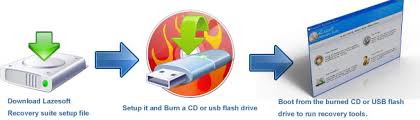
Once installed, creating recovery media is straightforward. From there, scanning drives, fixing boot errors, or resetting passwords is just a few clicks away. Unlike other solutions, everything you need is included, saving you time and reducing the risk of mistakes during critical recovery operations.
Conclusion
Whether you’re managing a client’s office computers, supporting a small business, or handling a mix of hardware emergencies, Lazesoft Recovery Suite 5.0.0.1 Technician Edition is an indispensable ally. Its all-in-one approach to file recovery, system repair, password resets, and drive cloning transforms stressful situations into manageable tasks. For IT professionals, this toolkit isn’t just software — it’s peace of mind.

Leave a Reply