 Skip to content
iFunia Video Converter: The Simple Tool That Makes Video Conversion Easy
If you’ve ever tried converting videos, you know how frustrating it can be. One file plays perfectly on your phone but won’t work on your laptop. A video looks great on your camera, but your editing software refuses to import it. Or you’re trying to upload to YouTube and the format isn’t supported. That’s when you start searching for a video converter that’s actually easy to use.
iFunia Video Converter is one of those tools that feels like it was made for normal people — not tech experts. It doesn’t try to be everything at once. Instead, it focuses on what matters most: converting videos quickly, reliably, and without a confusing interface.
If you need a simple, no-stress video conversion tool, iFunia Video Converter is worth a look.
What is iFunia Video Converter?
iFunia Video Converter is a software program that converts video and audio files into different formats. It supports common formats like MP4, AVI, MOV, MKV, FLV, and many more. It works on both Windows and Mac, which makes it useful for almost anyone.
The idea is simple: you open the program, add your file, choose the format you want, and click “Convert.” It’s that easy.
The best part is that iFunia doesn’t overload you with technical settings. You don’t need to know what codecs or bitrates mean. If you want a video to play on your phone, you choose the phone preset. If you want a video for YouTube, you choose the YouTube preset. It handles the rest.
Why You Might Need a Video Converter
Most people don’t think about video formats until they run into a problem. Then suddenly it becomes urgent.
Here are some real-life situations where iFunia Video Converter becomes useful:
- You filmed a video on your phone, but it won’t play on your computer
- You need to reduce the file size for faster uploading
- You want to convert a video to MP3
- Your editing software doesn’t support the file type
- You want to convert a video for social media
These are common problems. And iFunia Video Converter solves them without making you feel lost.
Clean Interface That Anyone Can Use
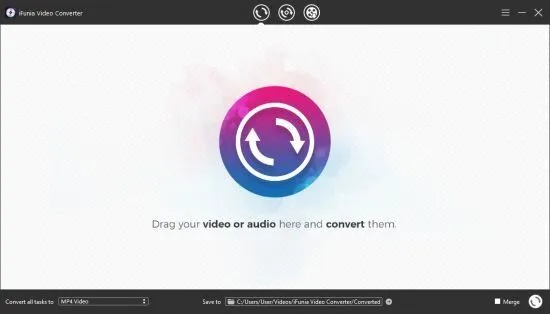
One of the biggest strengths of iFunia Video Converter is its clean interface. There are no confusing menus, no hidden settings, and no complicated options. It’s straightforward.
You can drag and drop files, choose a preset, and convert. That’s all you really need for most tasks.
It’s especially helpful for beginners. If you’re not tech-savvy, iFunia makes video conversion feel easy and stress-free.
Strong Format Support and Device Presets
iFunia Video Converter supports a wide range of formats. That means you can convert videos from almost any source and use them anywhere.
The program also includes device presets, which is a major convenience. Instead of guessing the best settings, you simply choose your device, such as:
- iPhone
- iPad
- Android phones
- Smart TVs
- Game consoles
iFunia automatically selects the correct format and settings for your device. That’s a huge time-saver.
Fast Conversion Speed
If you’ve used free video converters before, you know they can be slow. Some programs take forever to process a single video, especially if it’s HD or 4K.
iFunia Video Converter is faster than many free tools. It uses hardware acceleration and optimized conversion settings, which means you spend less time waiting and more time using your videos.
This is especially helpful when converting multiple videos at once.
Extra Features That Make a Difference
Even though iFunia keeps things simple, it still includes useful extra features:
Trim and Cut
You can remove unwanted parts of a video before converting. This is helpful if you recorded too much footage and want to shorten it.
Crop and Rotate
If your video is upside down or needs a different aspect ratio, you can fix it quickly.
Extract Audio
If you only need the audio from a video, iFunia can convert it to MP3 or other audio formats. This is great for saving music or voice recordings.
Batch Conversion
If you have multiple videos to convert, iFunia can handle them all at once. This is a major time-saver for creators and editors.
Is iFunia Video Converter Worth It?
If you need a tool that converts videos quickly, easily, and reliably, iFunia Video Converter is worth it. It’s not trying to be a full editing suite. It’s designed for people who just want the job done without hassle.
It’s perfect for:
- Students converting lecture videos
- Content creators preparing videos for social media
- People who want to convert home videos
- Anyone who needs a simple video conversion tool
The simplicity is actually the biggest advantage. You don’t need a long tutorial to use it — you just use it.
Final Thoughts
In a world where video is everywhere, having a reliable converter is essential. iFunia Video Converter stands out because it offers a clean interface, strong format support, fast conversion speed, and useful extras without confusing you.
If you’ve ever struggled with video formats, iFunia makes the process smooth and stress-free. It’s a practical tool for everyday use, and it’s easy enough for anyone to understand.
If you want a video converter that works without headaches, iFunia Video Converter is a smart choice.

Comments are closed.